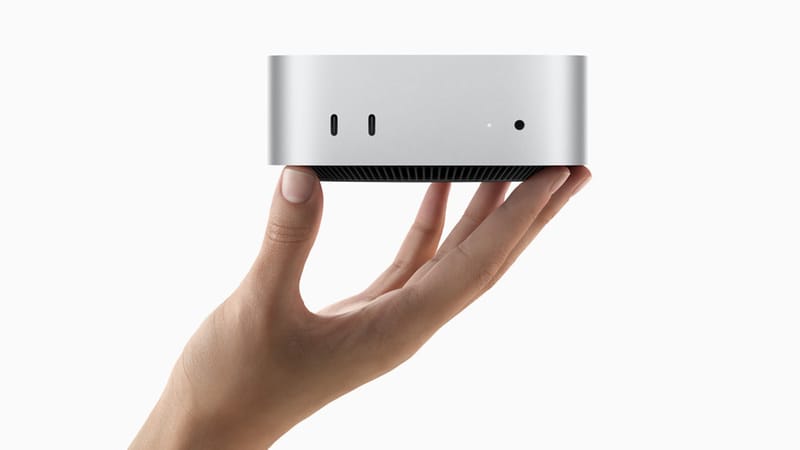
Breaking News: Mac Mini Makes a Strong Comeback
On August 25, 2026, Apple released its first updated compact desktop in two years—the new Mac mini. This device focuses heavily on artificial intelligence capabilities, catering to developers who prefer running models locally instead of relying on expensive cloud services.
The new machine features Apple's first 2nm M6 processor alongside a powerful M5 Pro option. The base model starts at $899, with preorders now available and deliveries expected in late September. According to Apple, the base model handles AI tasks up to four times faster, while the premium version can run larger models directly on the device.
Technical Highlights: Unified Memory Architecture Is Key
The most popular feature of the new Mac mini is its Unified Memory Architecture (UMA). This design allows the CPU and GPU to share a memory pool of up to 64GB, eliminating the overhead of copying data between CPU memory and GPU VRAM in traditional architectures.
For AI applications, this means: - Larger models run locally: 64GB unified memory can accommodate models with more parameters - Lower latency: No need to transfer data between CPU and GPU, resulting in faster inference - Higher energy efficiency: Reduced data movement lowers power consumption
Apple now positions this device as its "leading desktop for always-on agentic computing." This release coincides with Apple's plan to manufacture the machine in Houston for the very first time, marking another step in its supply chain diversification.
PLUS Tutorial: Deploying Local AI Assistant on Mac mini
For users who purchased the new Mac mini, here's a four-step method to deploy an AI assistant locally:
Step 1: Choose the Right Open-Source Model
Select a suitable model based on your needs: - Code Assistant: CodeLlama, StarCoder - General Conversation: Llama 3.1, Qwen2.5 - Specialized Domains: Med-PaLM (medical), Legal-BERT (legal)
Considering the Mac mini's 64GB memory limit, it's recommended to choose models with 7B-13B parameters, which can fully utilize the hardware while maintaining good performance.
Step 2: Install Ollama or LM Studio
Both tools simplify local model deployment:
# Install Ollama using Homebrew
brew install ollama

# Or download LM Studio (GUI)
# Visit https://lmstudio.ai/ to download the installer
Ollama is suitable for command-line users, while LM Studio provides a friendly graphical interface.
Step 3: Download and Load the Model
Using Ollama as an example:
# Download Llama 3.1 8B model
ollama pull llama3.1

# Start the model
ollama run llama3.1
The initial download may take a few minutes, after which the model will be cached locally.
Step 4: Integrate Into Your Workflow
You can integrate the local AI assistant into commonly used tools:
- VS Code: Install the Continue plugin and connect to local Ollama
- Terminal: Create an alias for quick access alias ai='ollama run llama3.1'
- Shortcuts: Use macOS Shortcuts to create one-click conversations
Pro Tip: If you need to run multiple models simultaneously, consider using vLLM or Text Generation Inference (TGI), which support multi-model concurrency and higher throughput. But for most individual users, Ollama is already sufficient.
Perspective: The Era of Local AI Is Here
The release of the new Mac mini reveals a trend: AI is moving from the cloud to local devices. In the past, running large models required expensive GPU servers or cloud service subscriptions. But now, a $899 desktop can handle most AI tasks.
What does this mean for the industry?
- Privacy protection: Data doesn't need to be uploaded to the cloud, suitable for handling sensitive information
- Cost reduction: One-time hardware investment vs. ongoing cloud service subscriptions
- Offline availability: AI functions work without internet connection
- Customization: Models can be fine-tuned according to needs,不受 cloud provider restrictions
Of course, local AI also has limitations: - Hardware ceiling: Cannot run ultra-large-scale models (such as GPT-4 level) - Update hassle: Need to manually download new model versions - Resource consumption: Long-term operation consumes significant memory and power
But for developers, researchers, and small teams, local AI is already a viable option. The unified memory architecture of the new Mac mini provides strong hardware support for this trend.
In the coming years, we may see more hardware optimized for local AI emerge. From smartphones to laptops, AI capabilities will become standard rather than optional. And for ordinary users, the biggest change will be: AI is no longer a distant cloud service, but an everyday tool within reach.