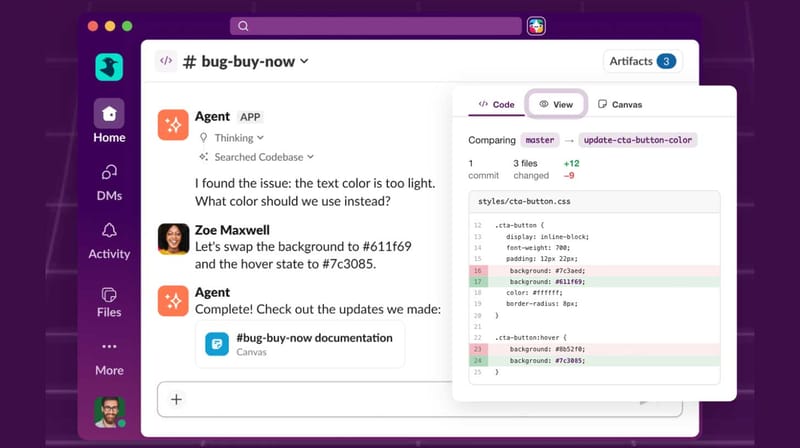
Slack launched new AI-assisted coding features, enabling team members to co-write, review, and deploy code directly within chat interfaces. Product managers describe requirements in natural language, AI generates code snippets; developers review and modify in real-time; non-technical staff participate in discussions without understanding implementation details.
The core is Slack's deep integration with multiple AI coding assistants (including Claude Code, GitHub Copilot). Users simply type "/code help me build a user login form" in a channel, and AI generates full frontend-backend code, automatically creating a Git branch.
- Lowering collaboration barriers: Previously, communication between product and tech required translation—now AI acts as "translator," both sides speak the same language (natural language)
- Accelerating iteration speed: Time from requirement to code shrinks from days to minutes; small teams can quickly validate ideas
-
Automated knowledge沉淀: All discussions and code changes remain in Slack history; new hires can backtrack decision processes directly
-
Microsoft Teams: Announced similar features for Q4, integrating GitHub Copilot and Azure DevOps
- Discord: Active developer community may launch lighter-weight coding bot ecosystems
- Traditional IDEs: VS Code, JetBrains need to思考 how to coexist with chat-style coding, not compete
Even if you're not a programmer, this change affects you:
- You can "command" AI to write code: Want a personal website or automation script? Tell AI in natural language; it completes the task
- More efficient team communication: No need for lengthy PRD documents; drive projects directly through Slack conversations
-
Flatter learning curve: Previously learning programming started with syntax; now start with "what I want" and learn backward
-
Install Slack AI app: Search "AI Code Assistant" or "Claude for Slack" in Slack App Directory, authorize to use
- Try /code command: Type
/code help me analyze this CSV filein any channel, upload the file, and AI generates Python code and runs it directly - Set up code review workflow: Configure auto-triggers in #engineering channel; when someone submits /code-generated code, automatically @ responsible reviewers